AC Troubleshooting Before Calling a Pro: 7 Easy Fixes
June 17, 2026

Before You Panic: AC Troubleshooting Before Calling a Pro
If you're dealing with a warm house and a system that won't cooperate, knowing the right steps for ac troubleshooting before calling a pro can save you real time and frustration — especially during a South Bay summer when every hour without cool air counts.
Here are the most common fixes to check first:
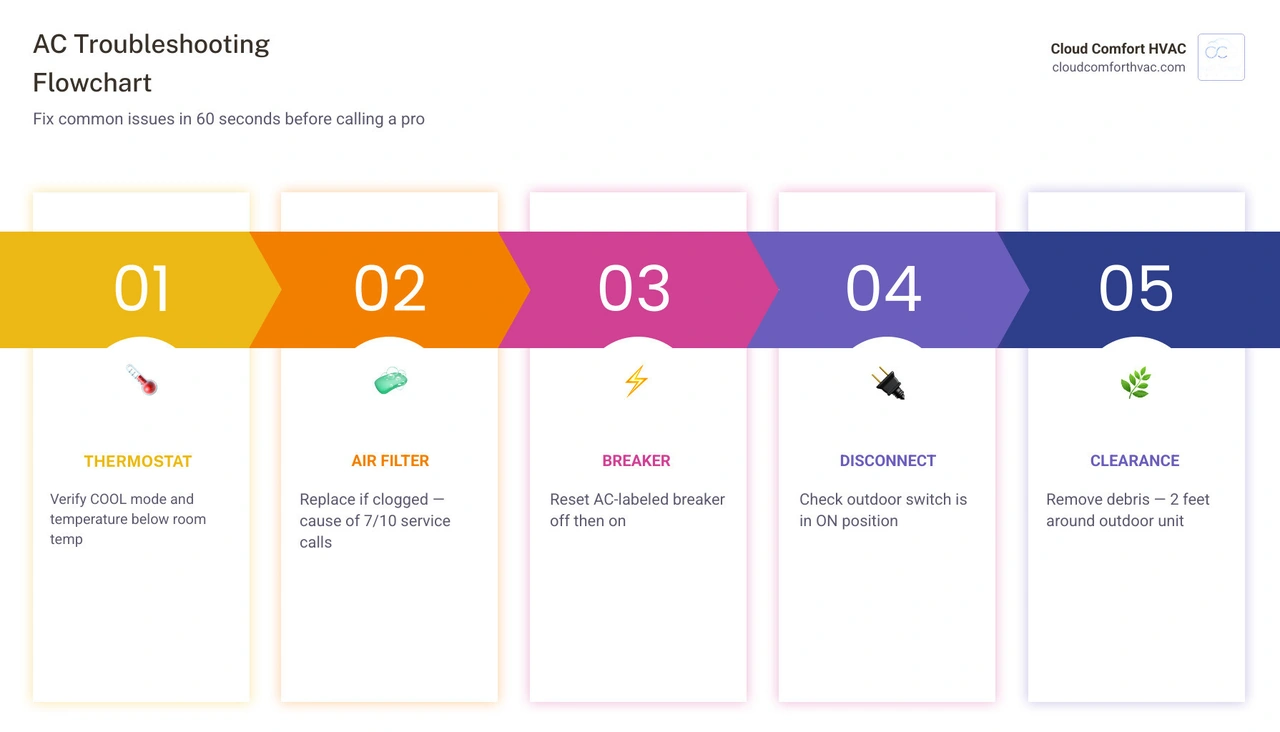
- Check your thermostat — make sure it's set to COOL, not HEAT or FAN ONLY, and that the temperature is set below the current room temp
- Replace the air filter — a clogged filter is the cause of roughly 7 out of 10 AC service calls
- Reset the circuit breaker — find the breaker labeled AC or HVAC, flip it fully off, then back on
- Check the outdoor disconnect switch — it may have been bumped off accidentally
- Look for ice on the copper lines — frost or ice means restricted airflow or a refrigerant issue
- Clear the condensate drain — a clogged drain triggers a float switch that shuts the whole system down
- Inspect the outdoor unit — remove debris and make sure there's at least 2 feet of clearance around it
Most AC problems aren't catastrophic. In fact, HVAC professionals consistently report that nine out of ten service calls trace back to something simple — a dirty filter, a wrong thermostat setting, or a tripped breaker. A quick check through these steps before you call anyone could get your home cooling again in minutes, not days.
This guide walks through each fix clearly, step by step, so you know exactly what to do — and when it's time to stop and call a licensed technician.
Essential AC Troubleshooting Tips Before Calling a Pro
When your air conditioner acts up during a sweltering afternoon in Manhattan Beach or Torrance, CA, it is easy to assume the worst. However, before you brace yourself for a major system failure, central air conditioning systems are highly sensitive to minor environmental and setting changes. Performing a little basic detective work is always the smartest first step.
Statistically, nine out of ten central AC service calls trace back to something incredibly straightforward, such as a dirty filter or incorrect settings. When these minor issues occur, they restrict airflow or interrupt electrical signals, causing the system to blow warm air or shut down entirely as a protective measure. By running through a systematic diagnostic process, you can rule out these simple issues.
To help you assess how well your system is actually running, you can perform a quick AC Performance Check to measure temperature differences and airflow strength. For a complete understanding of how your home's system operates and how to keep it in peak shape, consult our Home AC Repair Complete Guide.
Thermostat Settings: AC Troubleshooting Tips Before Calling a Pro
The thermostat is the brain of your HVAC system. If it is not communicating correctly, the rest of the system will remain completely silent.
First, verify that your thermostat is set to COOL mode. It sounds obvious, but family members, house guests, or even a slip of the hand during cleaning can accidentally switch the system to HEAT or FAN ONLY. If the fan is set to ON instead of AUTO, the indoor blower will run continuously even when the outdoor compressor is off, resulting in lukewarm air blowing from your vents.
Next, check the temperature setting. The setpoint should be at least 3 to 5 degrees below the current room temperature to trigger a cooling cycle. If the screen is completely blank, dim, or flashing a low-battery warning, replace the batteries immediately. Many digital and programmable thermostats require fresh AA or AAA batteries annually to maintain their programming and relay signals to the air handler.
If your thermostat screen is active but the system still fails to react to your commands, you may be dealing with a deeper communication issue. For more advanced troubleshooting steps, read our guide on What to Do When AC Thermostat Isn't Responding.
Power and Breaker Checks: AC Troubleshooting Tips Before Calling a Pro
Air conditioners are heavy-duty appliances that draw a significant amount of electrical power, especially during peak summer heatwaves in Culver City or Carson. If your AC refuses to turn on at all, you are likely facing a power delivery issue rather than a mechanical breakdown.
Start by inspecting your home's main electrical panel. Look for the circuit breakers labeled "AC," "Air Conditioner," or "HVAC." Sometimes, a breaker can trip without looking obviously out of place. To reset it safely:
- Locate the correct breaker and check if it has migrated to the middle "tripped" position.
- Push the switch firmly to the OFF position until you hear a distinct click.
- Wait about 30 seconds to allow the internal mechanism to cool.
- Flip the switch back to the ON position.
Safety Note: Only reset a tripped breaker once. If the breaker trips again immediately, do not attempt to reset it a second time. Repeated tripping indicates a serious electrical fault, such as a failed compressor capacitor or a short circuit, which presents a real electrical fire hazard. In this situation, professional intervention is required. Learn more about Solving Frequent AC Circuit Breaker Trips to understand why this happens.
Additionally, check the outdoor disconnect switch, which is typically housed in a small metal weather-proof box mounted on the exterior wall near your outdoor condenser unit. This box contains a switch, pull-out plug, or circuit breaker used to cut power during maintenance. Ensure this switch has not been accidentally bumped into the "OFF" position during yard work or outdoor cleaning.
Maximizing Airflow and System Hygiene
Proper airflow is the lifeblood of any central air conditioning system. When airflow is restricted, heat transfer cannot occur efficiently, forcing the system to work twice as hard to cool your home. Over time, poor system hygiene leads to frozen components, high energy consumption, and premature compressor failure.
If you notice weak airflow or uneven cooling in different rooms, you should review our comprehensive guide on Troubleshooting AC Airflow Problems to pinpoint the source of the restriction.
Inspecting and Replacing the Air Filter
A dirty, clogged air filter is the single most common cause of HVAC issues. It is the number one culprit behind frozen evaporator coils, weak vent airflow, and sudden system shutdowns. When a filter becomes choked with dust, pet dander, and pollen, it acts like a wall, blocking return air from entering the system.
For standard 1-inch pleated filters, we recommend checking them every 30 days during the heavy cooling season and replacing them at least every 30 to 60 days. If you have multiple pets, live near a construction zone, or suffer from severe allergies, you may need to replace your filter every 21 to 30 days.
When selecting a replacement filter, pay attention to the MERV (Minimum Efficiency Reporting Value) rating. For most residential systems, filters rated between MERV 8 and MERV 11 provide an excellent balance of air filtration and unrestricted airflow. Avoid MERV 13 or higher filters unless your HVAC system is specifically designed for them, as these dense filters can restrict airflow and cause the evaporator coil to freeze.
| Filter Type | Thickness | Recommended Replacement Frequency | Best For |
|---|---|---|---|
| Standard Fiberglass | 1-inch | Every 30 days | Basic dust protection; low-use homes |
| Pleated Synthetic (MERV 8-11) | 1-inch | Every 30 to 60 days | Standard residential; pet owners; mild allergy sufferers |
| Deep Media Filter | 4 to 5-inch | Every 6 to 12 months | High-efficiency systems; superior filtration; busy households |
To ensure you are selecting and installing your new filter correctly, review our step-by-step guide on AC Filter Replacement.
Clearing Vents and Outdoor Condenser Obstructions
Airflow must remain unobstructed both inside and outside your home. Walk through your living spaces and check all supply registers (the vents that blow cool air) and return air grilles (the larger vents that pull air back into the system). Ensure that furniture, heavy drapes, rugs, or toys are not blocking these openings.
A common mistake: Closing vents in unused rooms to "save energy" is actually highly detrimental. Modern HVAC systems are carefully balanced. Closing vents increases static pressure within your ductwork, which can cause duct leaks, strain the blower motor, or even freeze the evaporator coil. Keep at least 80% of your indoor vents completely open at all times. If you suspect your ductwork is already suffering from pressure strain, watch for the Signs Your AC Ductwork Needs Attention.
On the outside of your home, inspect the outdoor condenser unit. The compressor and fan inside this unit need to release the heat pulled from your indoor air. If the unit is choked by overgrown shrubs, tall grass, weeds, fallen leaves, or stored items, it will overheat and shut down. Maintain a minimum of 2 to 3 feet of clear space around all sides of the outdoor unit, and at least 5 feet of clearance above it. Gently brush away loose leaves or twigs from the exterior fins, and rinse them down with a garden hose on a gentle spray setting if they look dusty. Never use a pressure washer, as the high-pressure stream will instantly bend and ruin the delicate aluminum fins.
Managing Drainage and Frozen Evaporator Coils
Your air conditioner does more than just lower the indoor temperature; it also dehumidifies your home. As warm, humid air passes over the cold indoor evaporator coil, moisture condenses on the coil's surface and drips down into a drain pan. This water must flow safely out of your home through a condensate drain line.
Water-related issues account for nearly 90% of central air service calls during humid periods. When water cannot drain properly, modern systems use safety devices to prevent costly water damage to your ceilings and floors. If you are experiencing water pooling around your indoor unit, read our article on How to Identify and Fix AC Drainage Problems.
Unclogging the Condensate Drain Line
Over time, the warm, dark environment inside your condensate drain line becomes a breeding ground for algae, mold, and sludge. If a clog forms, water will back up into the drain pan. Most modern indoor air handlers are equipped with a safety float switch. When the water level in the pan rises, the float floats upward, instantly cutting power to the thermostat or the compressor to prevent an indoor flood. If your thermostat suddenly loses power or your system refuses to turn on, a tripped float switch is a highly likely suspect.
You can easily clear a clogged drain line yourself using a standard wet/dry shop vacuum:
- Locate the exterior condensate drain outlet outside your home (usually a small PVC pipe dripping near the outdoor condenser).
- Attach the hose of your wet/dry vacuum to the end of the PVC pipe. Use a towel or duct tape to create a tight seal around the connection.
- Turn on the vacuum and let it run for 2 to 3 minutes. This will safely pull the clog of algae and debris out of the line.
- Empty the vacuum canister to see the debris and water you successfully extracted.
To prevent future clogs, locate the T-shaped drain access port near your indoor air handler. Pour one cup of regular white distilled vinegar down the line once every few months. The natural acidity of the vinegar will kill off lingering algae and keep the line flowing smoothly.
Thawing Frozen Evaporator Coils
If you notice weak airflow, a system that runs continuously without cooling, or actual ice forming on the brass valves and copper refrigerant lines of your outdoor unit, your indoor evaporator coil is likely frozen solid.
A frozen coil is typically caused by one of two things: restricted airflow (such as a severely clogged filter or closed vents) or low refrigerant. When the airflow is choked, there isn't enough warm air passing over the coil to keep the cold refrigerant from dropping below freezing. Moisture on the coil quickly turns to ice, creating an insulating block that completely stops heat transfer.
If your system is frozen, follow these steps:
- Turn the AC completely OFF at the thermostat.
- Switch the thermostat fan setting from AUTO to ON. This runs the indoor blower fan without running the outdoor compressor, forcing warm indoor air over the frozen coil to melt the ice safely.
- Allow the system to thaw completely. This process typically takes 4 to 6 hours. Do not attempt to scrape the ice off the coils yourself, as you can easily puncture the delicate copper tubing.
- While the system is thawing, inspect and replace your air filter. Ensure all vents are completely open.
- Once the ice has melted completely, switch the fan back to AUTO and turn the cooling mode back ON.
If the system freezes up again within a few hours of operation, you are likely dealing with a refrigerant leak or a faulty blower motor. For more details on why your system is icing over, check out our guide on Why is My AC Freezing Up in the Summer Heat. If the system continues to blow warm air even after thawing, review our checklist on What to Do When AC is Blowing Warm Air.
When to Stop DIY and Call a Licensed HVAC Technician
While basic troubleshooting is highly encouraged, there is a clear boundary where DIY efforts must stop for your own safety and the longevity of your equipment. Central air conditioners contain high-voltage electrical circuits, heavy moving parts, and pressurized chemical refrigerants.
Handling refrigerant requires specialized tools, recovery systems, and federal EPA Section 608 certification. Attempting to add refrigerant yourself is illegal, highly dangerous, and will immediately void any manufacturer warranties. If you suspect your system has a refrigerant leak, read our guide on How to Troubleshoot AC Refrigerant Leaks to learn about the signs of a leak and how professionals safely resolve them.
To help you recognize when a simple fix won't cut it, familiarize yourself with How to Tell When It's Time for an AC Repair - 7 Warning Signs to Watch Out For.
Recognizing Serious System Failures
If you encounter any of the following warning signs during your troubleshooting process, shut down your system immediately and call a professional:
- Unusual Noises: A healthy AC should run with a quiet hum. If you hear metal-on-metal grinding, loud screeching, or persistent banging, your blower motor bearings or compressor may be failing. If you hear a loud grinding sound, read Why is AC Making Grinding Noise. A persistent hissing or bubbling sound usually points to a high-pressure refrigerant leak.
- Burning Odors: If you smell electrical burning, ozone, or sulfur coming from your vents, turn off the power at the main breaker panel immediately. This indicates overheating wires, a seized motor, or a failing control board. If you smell musty, damp, or moldy odors instead, consult What Causes Musty Odors from Your AC.
- Rapid Short Cycling: If your system turns on and off every few minutes without actually cooling your home, it is short cycling. This puts immense strain on the compressor and can be caused by faulty control boards, failing capacitors, or mismatched equipment.
Deciding to Repair vs. Replace Your System
If your air conditioner is constantly breaking down and requires frequent professional visits, you may need to look at the bigger picture. Most modern central air conditioning systems have an expected lifespan of 15 to 20 years. However, in coastal South Bay climates where salty air can accelerate corrosion, a system over 12 years old with frequent component failures may be reaching the end of its reliable service life.
When deciding whether to invest in another repair or move forward with a replacement, consider the age of the unit, the frequency of breakdowns, and your monthly energy bills. Older, low-efficiency systems consume significantly more electricity than modern, energy-efficient inverter systems.
For a detailed breakdown of this decision, read our guide on Should I Repair or Replace My Air Conditioner in the South Bay or Orange County.
Frequently Asked Questions about AC Troubleshooting
Why is my AC running but not blowing cold air?
If your air handler fan is blowing but the air coming from your vents is lukewarm, start by checking your thermostat settings to ensure it isn't set to "Fan Only" or "Heat." Next, inspect your air filter and the outdoor condenser unit. If the filter is clogged or the outdoor unit is caked in dirt and leaves, heat cannot be released, preventing the system from cooling. If those are clean, you may have a failed compressor capacitor or a refrigerant leak. If you have a heat pump system and want to understand how reversing valves and settings can cause temperature confusion, you can read Why is My Heater Blowing Cold Air.
How do I perform a safe system reset on my AC unit?
To perform a safe "hard reset" on your air conditioner to clear minor electronic glitches:
- Turn your thermostat completely OFF.
- Go to your main electrical panel and flip the AC circuit breaker to OFF.
- Go to the outdoor disconnect box and turn it OFF (or pull out the disconnect plug).
- Wait a full 5 to 10 minutes. This allows the system's electrical charges to dissipate and the internal refrigerant pressures to equalize safely.
- Restore power at the outdoor disconnect, then flip the main circuit breaker back ON.
- Turn your thermostat back to COOL and set the temperature below room temp.
What causes my AC to cycle on and off rapidly?
Rapid cycling (short cycling) is often caused by a severely restricted air filter that causes the internal evaporator coil to overheat or freeze, triggering a safety switch shutdown. It can also be caused by a thermostat located in a drafty area, near a hot appliance, or in direct sunlight, which tricks the sensor into reading rapid temperature changes. In some cases, short cycling is the result of an oversized HVAC system that cools the home too quickly without running long enough to remove humidity. For tips on managing humidity issues alongside short cycling, read Addressing Humidity Issues with AC System.
Conclusion
Taking the time to perform basic ac troubleshooting before calling a pro is a smart, empowering way to manage your home's comfort. By checking your thermostat settings, keeping your air filters fresh, resetting tripped breakers, and ensuring your condensate lines are clear, you can resolve the vast majority of common cooling complaints yourself.
However, when DIY troubleshooting has reached its limits, or if you encounter serious electrical or refrigerant issues, you need a team you can trust. At Cloud Comfort HVAC, we provide expert, eco-friendly cooling and heating services to homeowners throughout Rancho Palos Verdes, Manhattan Beach, Culver City, Torrance, Palos Verdes Estates, and Carson, California. As a customer-first provider, we focus on energy-efficient solutions, transparent pricing, and robust Daikin warranties backed by our 1-year Comfort Promise.
To keep your system running smoothly and prevent unexpected breakdowns before the summer heat peaks, read our AC Maintenance Program Ultimate Guide.
If your air conditioner is still acting up after running through these checks, don't sweat it! Schedule professional AC repair with Cloud Comfort HVAC today, and let our friendly, expert technicians restore perfect comfort to your home.
Have an HVAC or plumbing question?
Our Torrance comfort experts are here to help — no pressure, just honest answers.
Ask an Expert